



“Runs itself” is a big promise for a coworking space.
There will always be a room to prepare, a member to welcome, or a problem that needs a thoughtful conversation.
But there is a useful ambition behind the phrase. Someone should be able to join, pay, book a room, and get through the door without your team having to arrange each step separately. When something needs personal attention, it should reach the right person.
You may already have much of this in place: online bookings, recurring payments, a member app. The next step is making those parts work together. That is where a space starts to become more autonomous—not by becoming less personal, but by needing less day-to-day coordination.
Start with a member’s first visit
A standard membership is a good place to begin. Follow it from purchase to arrival, including anything your team does outside the main management system.
The member may need to accept an agreement, pay, receive access, and learn where to go. At each stage, consider what your team’s involvement adds. A conversation about choosing the right plan has a different purpose from copying a payment confirmation into another system. You may want to preserve the first and connect the second.
It helps to agree what “ready” looks like. The agreement and payment are recorded, access is available from the agreed date, and the member has the right arrival information. A welcome email alone cannot tell you that all of this has happened.
The rules behind the membership need to be clear too: the start date, location, access hours, and anything that requires approval. Use those rules as the basis for your setup, rather than asking software to resolve an arrangement your team would normally discuss.
Follow the information all the way through
Take a membership starting next Monday. For this example, the agreement and first payment must be completed before access begins. Your own policy may be different.
The purchase creates or updates a customer record containing the plan, location, start date, and billing details. The other systems need to work from that same information, without a colleague entering it again at each stage.
Once the agreement is accepted and payment succeeds, the membership can be ready to start. If your access connection supports it, the correct location and hours can be arranged for Monday—not immediately, and not whenever someone next checks the account.
This is worth walking through with your provider. Has the access system confirmed that everything is ready, or has it only received a request? What happens if the payment is incomplete? Who hears about a failed access update? Could a repeated purchase notification send another welcome or create a duplicate record?
Ask to see those cases in your actual setup. You are checking how the operation behaves, not just whether two products can connect.
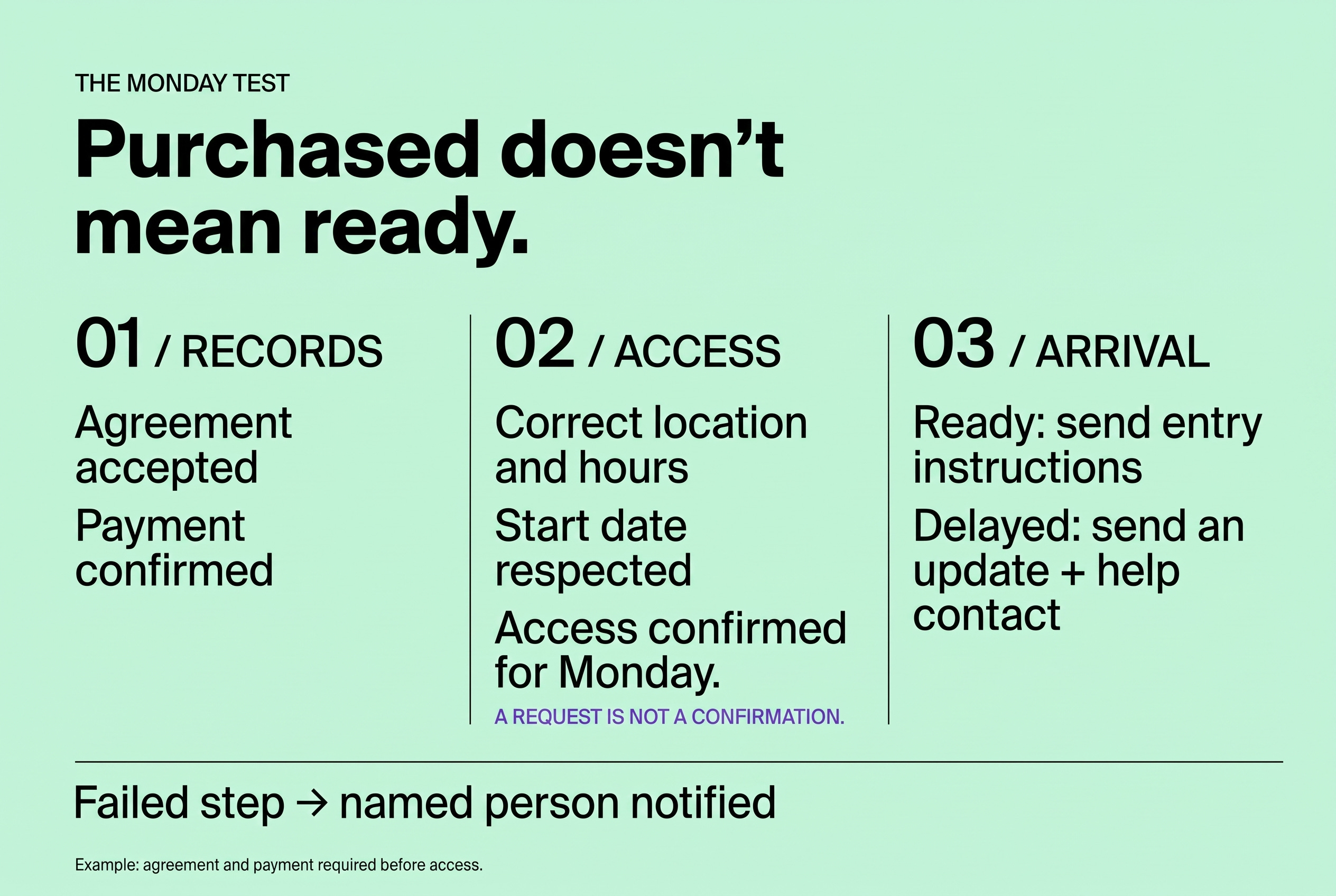
Arrival information should reflect the result. If access is ready, explain how to use it. If it is still being arranged, give the member an accurate update and a way to get help.
Follow the process at the other end as well. A cancellation or plan change needs to reach billing and access at the agreed time. Joining, changing, and leaving are all parts of the same routine.
Make everyday tasks easy to complete
Once that journey works, room bookings and recurring billing are natural places to continue.
For a member, booking should be straightforward: see availability, understand the cost or credit use, and confirm. Put the cancellation rules where they can read them before deciding. Keep invoices and help easy to find in the same member experience.
Behind the scenes, check how changes affect the rest of the process. Does cancelling release the room? Are credits or charges adjusted according to your policy? What happens when there are not enough credits, or two members request the same slot?
Try these cases from a member account. They are useful checks of whether the whole task works without a separate correction by the team.
Recurring billing needs the same distinction between the ordinary and the unusual. Let the agreed plan drive the normal invoice and payment cycle where your tools support it. Bring failed payments and disputes to someone who can review them. A payment reminder and an access restriction are different decisions; keep the latter subject to your policy and appropriate review.
Self-service should give members more freedom, not less support. They can handle familiar tasks when it suits them and still speak to someone when they need to.
Where intelligence helps
So far, much of this is ordinary automation: an agreed rule produces a predictable action. That is often exactly what you need for billing dates, fixed charges, and booking limits.
AI has a different role. It can help interpret a question or bring together information for a useful answer. An assistant might draft an email when you ask. An agent can be configured to begin when an event occurs, check records, and carry out a specific assignment using tools it has permission to access. The available actions depend on your platform and its connections.
Think of operational intelligence as those abilities working together: finding the relevant information, interpreting what is needed, and taking an agreed next step. It builds on the processes you have already put in place.
Spacebring Intelligence brings these capabilities into coworking operations: Spacebring Agent answers questions and takes action when asked, while configured agents carry out assignments on a schedule or when specified events occur.
A welcome message is a simple example. A template may do the job perfectly well. An agent may help when the message needs to reflect the plan, location, language, and whether the purchaser is actually new. An existing member buying another subscription probably does not need first-day instructions again.
Give that task a clear brief. Explain what starts it, which records to check, when to send nothing, and who handles missing details. Make flagging missing access instructions part of the brief rather than letting the agent improvise. Limit its permissions and review test messages before allowing it to act independently.
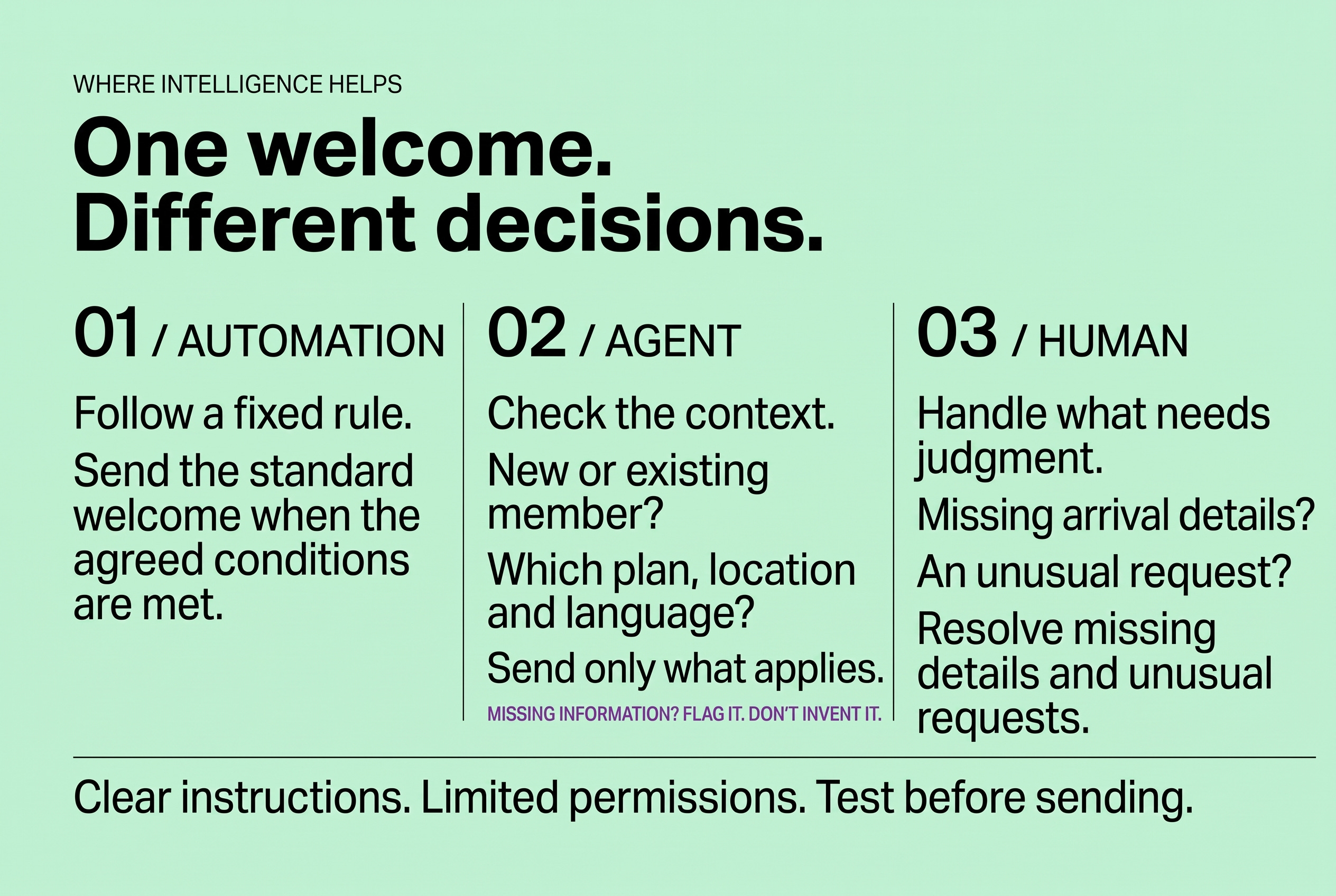
Support offers another use: routine questions can draw on current guides, while unanswered or sensitive requests go to the team. The handover needs a named recipient and a workable notification—not just a reassuring reply to the member. Facts such as payment status and room availability should come from the systems that hold them.
There is no need to add an agent to every process. Use intelligence where it reduces work that fixed rules cannot handle well.
Keep the building in the picture
The digital side is only part of running a space. Cleaning, room setup, supplies, and maintenance still need people and reliable arrangements.
If a booking requires a special setup, decide how that request reaches the person doing the work and how they confirm it is ready. When the booking changes, the preparation needs to change too. That might happen through a supported connection or a shared schedule—whichever your team can use reliably.
A room fault needs both a repair and an availability update. Agree who handles each and who checks the room before it returns to use. Keep regular checks and cover arrangements for work that does not begin with a member request.
The purpose is not to automate physical work. It is to make the coordination easier, including when colleagues cover for one another.
Make it clear when a person is needed
As more routine work runs independently, your team needs a useful view of what remains unfinished: an agreement awaiting acceptance, access not yet confirmed, a disputed charge, or a question needing an answer.
Give each case a responsible person and agree when it needs further attention. An urgent entry problem needs a different route from a routine invoice query, particularly outside staffed hours. Keep your building’s safety procedures and a way to pause automation and complete a task manually.
Before relying on a new process, test successful and incomplete journeys with staff accounts or controlled recipients. Look at the member’s experience, the records in each system, and the request that reaches the team.
Afterwards, keep a short record of where people step in and why. Repeated arrival questions might suggest a useful addition to the welcome information. Missed updates might point to a connection that needs attention. Other requests may be exactly the kind you want a person to handle.
Start with one membership journey, get it working from beginning to end, and build from there. Measure whether routine tasks finish correctly and how much checking remains, rather than how many automated actions occur.
A more autonomous space should feel easier to use and easier to look after. Members can get on with their day, colleagues know what needs attention, and your team has more room for the conversations and care that make the space worth joining.
